Help
The things people get stuck on, and what to do about them. If your question is not here, ask us and we will answer it properly.
Not started yet, or not sure what happens next? Getting started shows every screen from signing up to your first post.
Getting your first month
Nothing has been written yet. What do I do?
Your first month starts being written the moment you press "Finish and write my month" at the end of setup. After that, go to Dashboard and press "Write my month" for a new one. We plan the next 30 days first, then write the pieces in that plan, as far as your monthly allowance goes. Keep the page open until the bar is full. Each piece is saved as it is written, so if the page closes part way nothing is lost: open your Dashboard on the same device and it carries on, or press "Write the remaining" from anywhere else.
How long does it take?
Under a minute for ten pieces when we timed it, and longer on a bigger plan. The progress bar counts pieces actually written and saved, not an animation, so if it stops moving something has genuinely gone wrong rather than looking like it has.
It stopped part way through. Have I lost the pieces I paid for?
No. Everything written before the interruption is saved, anything that failed is refunded to your allowance, and it carries on from where it stopped, rather than starting over or writing anything twice: by itself when you next open your Dashboard on the same device, or when you press "Write the remaining" there.
When the writing is wrong
It has got something wrong about my business.
Everything we write comes from your business profile, so fix it there and the next thing we write is right. Business profile in the sidebar, then Edit beside the part that is wrong. Correcting a single post fixes that post; correcting the profile fixes everything after it.
I answered the setup questions and my answers have changed.
Settings, then "Change my answers". Saving updates your business details in the same step, so you do not have to remember a second button. If you gave us a website instead of answering questions, use "Read my website again" on the same screen.
It does not sound like me.
There is a Brand voice section on your business profile, and it is worth being blunt in it: "no exclamation marks", "never call people guys", "plain, no jargon". For a single piece, open it and use the rewrite options beside it, or type an instruction like "make it warmer" in your own words.
Will it make things up about my business?
It is built not to. We only use what is in your profile, and it is instructed never to invent prices, services, qualifications, awards or guarantees. If something is unknown it writes around it rather than guessing. If you ever see an invented fact, that is a bug worth telling us about.
Posting
How does a post actually go out?
Open the piece, read it and press Approve. If it is for a channel we post to and you have connected it in Settings, the piece has a button reading "Post it for me" and its date (if it has no date, choose one first). Press it, then "Yes, schedule it", and we post it that day at about the time shown. You do not need to be there, and you can cancel on the same page until then. A date on its own is only a reminder: nothing is posted for you until you press that button, or post it now. For anything that is not posted for you, the caption is put on your clipboard and we open the right place to paste it.
Why can some things not be posted automatically?
A personal Instagram account cannot be published to by any software, and that one is the network rather than us. A Story goes up only when you tick "Also add it to my Story" on the post, and it shows the photo or clip without the words, because a Story has none. A video on an Instagram piece does go out, as a Reel, and you can choose the moment of the clip that becomes its cover. Blog articles are never published for you either, deliberately, because they go on your own website where the address and the tags have to match how your site is built.
I want a post about something specific.
"Write a post or advert" in the menu. Tell us the subject in your own words, or pick a page from your website, choose where it is going, and we write it. Useful for something that has just happened: a job you have finished, a price change, a question customers keep asking.
Can I write a post myself?
Yes. On "Write a post or advert", choose where it is going and press Start writing under "Or write it yourself". You get an empty post: type your words, add your photos or video, and choose the day. It does not use the pieces we write for you. Each plan includes as many posts of your own a month as pieces we write: 10 on Starter, 10 on the free trial, 30 on Business and 90 on Pro. Settings, then Account, shows how many you have used. Editing a post we wrote never counts as one of yours.
Can I move something to a different day?
Yes. Drag it to another day on the calendar, or open the piece and change the date on it. On a phone, open the piece and change the date, because dragging does not work from a finger.
Adverts
How do adverts work?
Adverts come with the Business and Pro plans. Open "Write a post or advert", choose an advert under Write for (one picture, several pictures, or a video), say what it is about, and press Write an advert. We write the words, and each box has a Copy button. You run the advert yourself in Meta Ads Manager, where you choose the budget and the audience. We never place adverts, spend your money, or touch your ad account.
Photos and videos
Where do the photos come from?
From you, first. Every post comes with one line saying what to photograph, and you upload your own: a photo of your real work is always the best picture. When a post has no photo, paid plans can make an AI image for it, with your title on it. We never use stock photos, because they show somebody else's work.
How do AI images work?
When a post has no photo of your own, paid plans can make an AI image for it: a picture made for the post, with your title on it. Starter includes 5 a month, Business 10 and Pro 30. The free month has none, unless you choose a plan during it: then you get that plan's AI images straight away. Making one, or pressing Try again, uses one. Changing the design or the words is free. The words on the first picture come from your post's name and its first sentence. Your own photo is always better, so use an AI image when you have none, and check it before you post.
Can I get more AI images?
Yes, with an AI image pack: 25 images for £5.99 or 300 for £59.90, from your first payment. One payment, nothing renews. They are used after your monthly ones and kept until used while you are on a paid plan. AI image packs cannot be refunded.
I do not have a photo for this one.
Post it without one, or on a paid plan let PostMinder make an AI image for it. Nothing stops you adding your own photo later.
Can I put a video on a post?
Yes, on the Business and Pro plans. Add it on the post itself, or upload it once on the Photos and videos page and use it on as many posts as you like. We can post it for you to Instagram, where it goes out as a Reel, to your Facebook page, to LinkedIn, to TikTok, to YouTube as a Short, to X, and to your Google Business Profile. A post can hold both photos and a video, and you set the order they appear in, but one we post for you is your photos or one video, not both together, except on Instagram, which takes them mixed. Anywhere else, if it has both, we tell you before posting so you can remove one. On the free trial and Starter, we still post TikTok photo posts for you, and you can film a TikTok or YouTube clip on your phone and post it from there.
How much video can I keep?
Each paid plan comes with an amount of space, and the Photos and videos page shows how much of it you have used and how much is left. Nothing is ever deleted to make room: if a video will not fit, we say so and leave everything alone. Deleting one you have finished with frees the space straight away.
It will not accept my video.
There is a size limit for a single video, and if you go over it we tell you the size of your file and the largest we can take. Phones record in 4K unless you change a setting, which makes very large files, so recording at 1080p or trimming the clip usually brings it under.
I deleted a photo and it vanished from a post.
That is on purpose. Anything you upload on the Photos and videos page can be used on several posts at once, and there is only ever one copy of it. Before you delete, we tell you how many posts are using it. Those posts keep their words and simply lose the picture.
Connecting your channels
How do I connect a channel?
Go to Settings, then Posting, and press Connect beside the channel. Sign in to that network if it asks, and say yes. You come back to PostMinder, which says it worked. Instagram connects through your Facebook Page: your Instagram needs to be a business or creator account linked to that Page, then connect Facebook.
A channel says it needs reconnecting.
Networks sometimes stop accepting posts from us, for example when you change your password or remove our access. LinkedIn also only lets us post for a fixed time, and we email you a week before it runs out. Press Reconnect in Settings, then Posting. Anything waiting will go out as scheduled.
What happens if I disconnect a channel?
We stop posting there. Nothing already posted is affected, and you can reconnect at any time. Posts scheduled for it will not go out while it is disconnected, and we email you about it once a week rather than for each post.
When your posts go out
What time of day do my posts go out?
Whatever time you chose. Settings, then Posting, then "What time of day should your posts go out?", and pick an hour. Everything follows it from then on, including content that was already written. Setup starts you on 19:00 and says so on the screen, so there is no hidden default: you know when your customers look at their phones better than we do, so change it if another hour suits them.
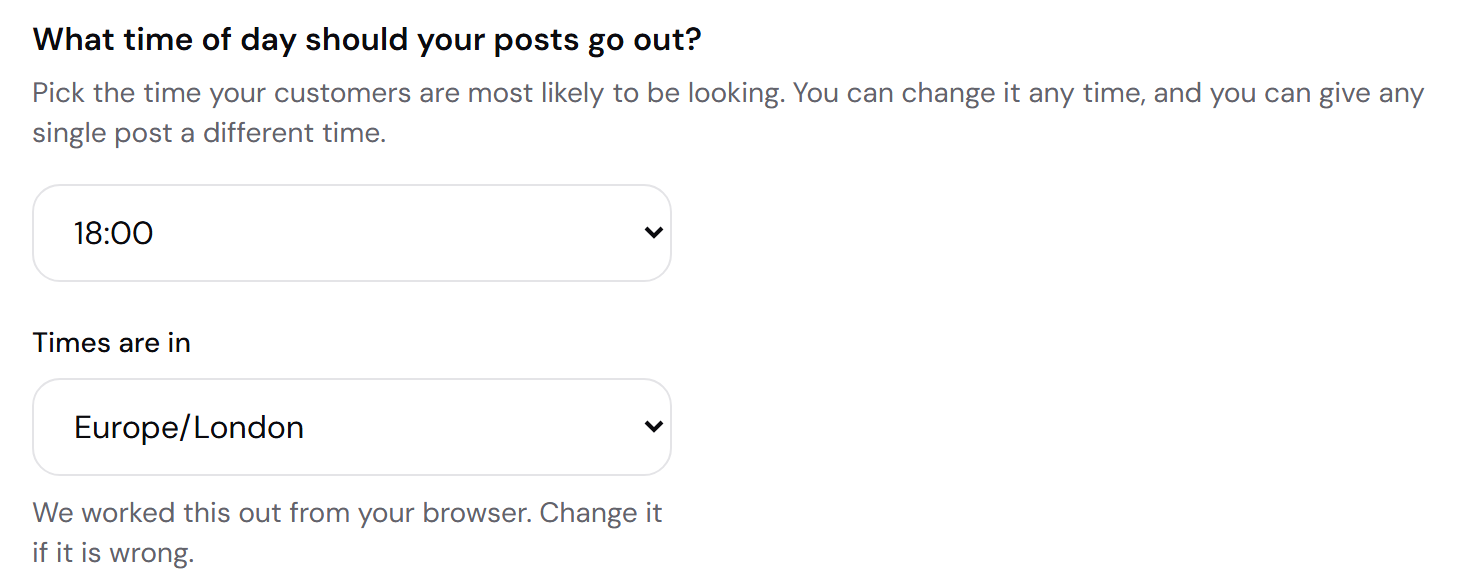
I never chose a time. What happens?
Nothing goes out at an hour you did not pick. Until you choose one, a piece belongs to its day and you decide the moment, exactly as it worked before the setting existed. The dashboard will list it as ready to post for the whole of that day rather than waiting for an hour nobody set.
Can one post go out at a different time from the rest?
Yes. Open the piece from Content or the calendar and change Time, which sits under Day. It shows your usual time as the first option, so you can see what you are changing it from, and setting it affects that one piece only.
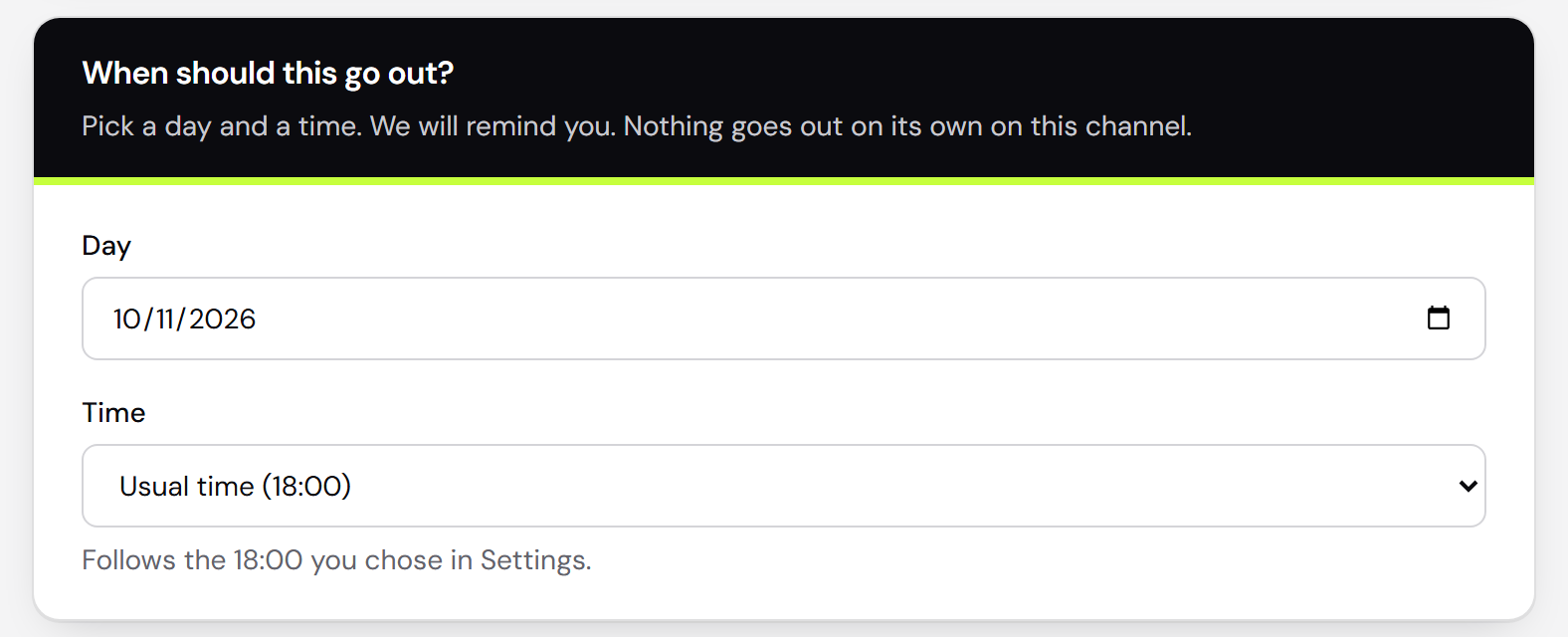
I changed my time. Does old content move?
Yes, everything that is still following your usual time moves with it, including pieces already written and approved. Anything you gave its own time keeps that time, because you set it deliberately.
Your answers, and your business profile
Something about my business has changed.
Settings, then "Your setup answers", then "Change my answers". It reopens the same ten questions with what you said last time already filled in. Saving updates your business details in the same press, so there is no second button to remember.
Will changing my answers cost me a piece of content?
No. Rebuilding your profile does not touch your monthly allowance. There is a limit on how many times a month it can be rebuilt, because it does real work behind the scenes, but it is set well above anything a normal correction would need. If nothing has actually changed, saving costs nothing at all.
The profile has something wrong in it.
Business profile in the sidebar, then Edit beside the part that is wrong, and correct it directly. That is the fastest fix. If it is wrong because what you told us at setup was wrong, change the answers instead, or the next rebuild will put the old version back.
The calendar, and moving work about
How do I move a post to a different day?
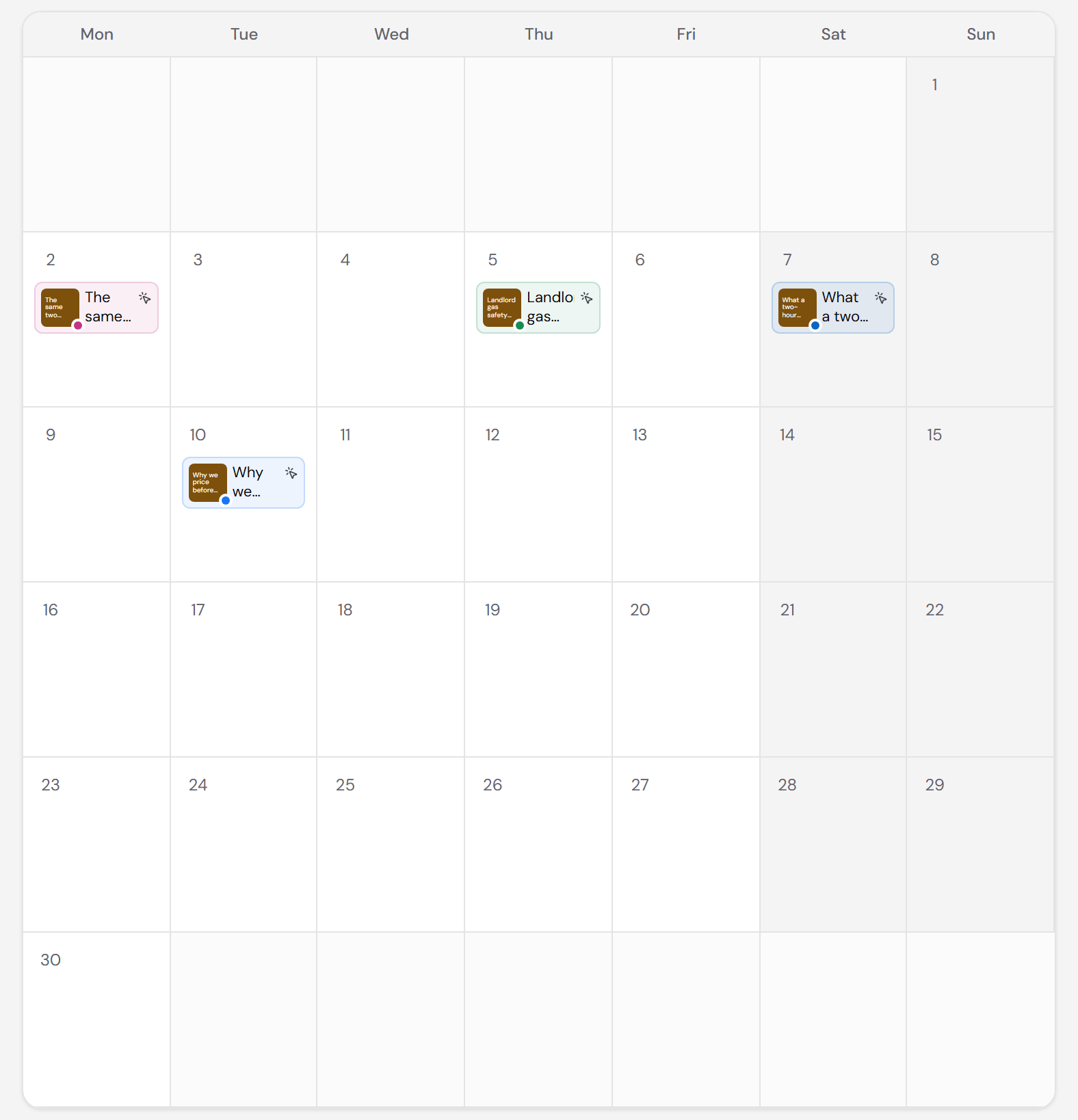
On a computer, drag it to the day you want on the Calendar. On a phone, open the piece and change Day, because dragging does not work reliably from a finger. On a phone, the calendar shows a list of days rather than a grid, for the same reason.
I want a post about something that happened today.
"Write a post or advert" in the menu. Type the subject, choose where it is going, and press the button. It writes it there and then, which spends one piece from your month. If you would rather line something up without spending anything yet, add a day on the Calendar instead and write it when you are ready.
Why does it ask which channel before I write anything?
Because the channel decides the length, the tone and whether there are hashtags, all before a word is written. A Google Business post and a LinkedIn post about the same job are not the same piece of writing. If you only use one channel we do not ask.
Ideas, and what to write about next
What is the ideas board for?
Ideas in the sidebar. It looks for things your marketing is missing: a service you never promote, an area you cover but never mention, a question customers ask that you have never answered. Each one says why it matters, and "Create content" turns it into a post.
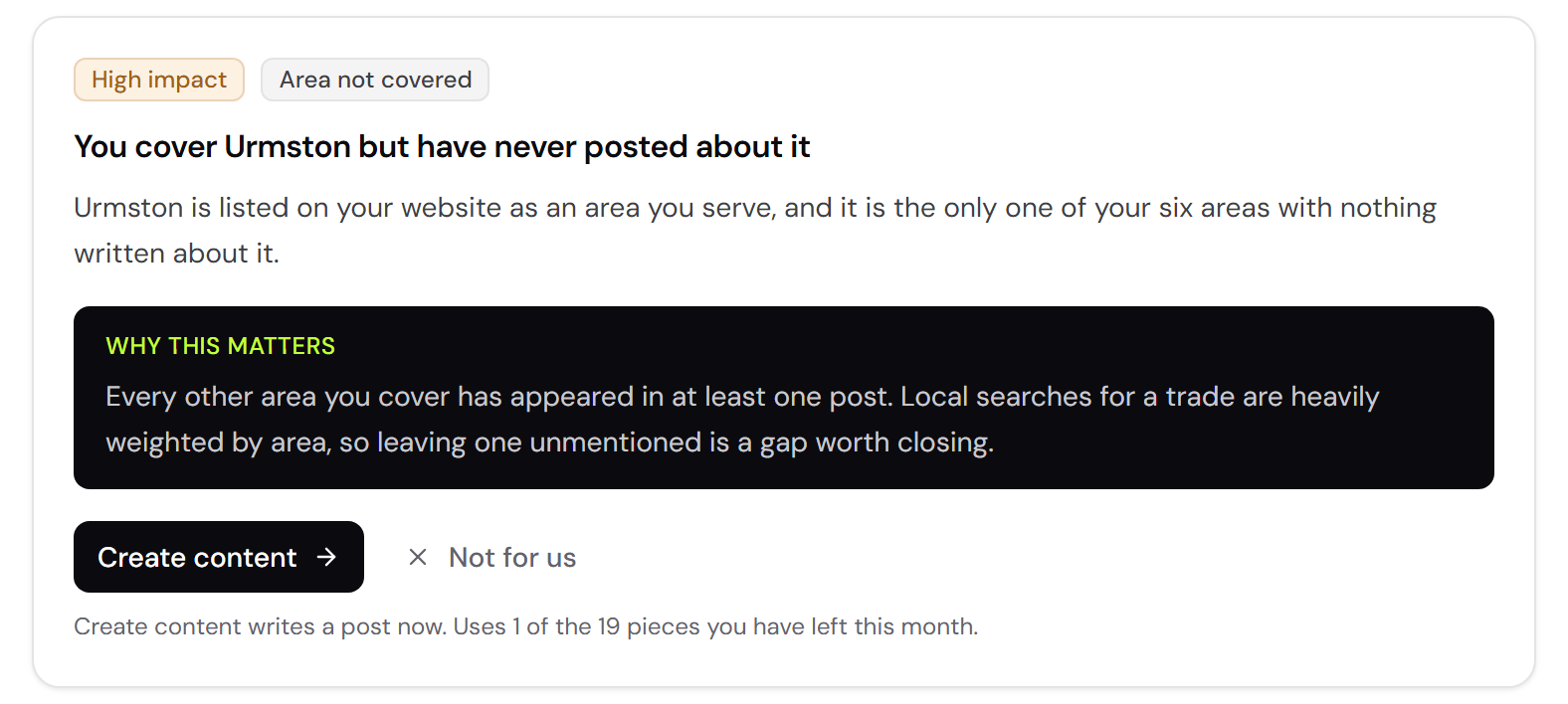
Does asking for ideas use up my allowance?
No. Planning your month and asking for ideas are both free, and only writing a piece counts. "Find new ideas" is capped per month so it cannot run away with itself, but the cap is generous and you are unlikely to meet it.
Your plan
What counts against my monthly allowance?
Writing a piece for the first time. Planning your month is free, asking for ideas is free, and the first two rewrites of any piece are free. After that a rewrite counts as a piece.
I have run out this month.
Everything already written stays yours to edit, approve and post. The allowance resets on the same date each month, and Settings shows when. To upgrade sooner, choose a bigger plan in Settings, then Account.
How do I cancel?
Go to Settings, then Account, and press Manage under your plan. You can cancel at any time. Your plan runs to the end of the period you have paid for, and everything you have made stays yours after that.
Can I get my money back?
If you are buying as a consumer, you can cancel within 14 days of your first payment and get your money back, on a monthly or a yearly plan. Email support@postminder.co.uk and we refund it within 14 days. After that we do not refund part of a month or year, and your plan runs to the end of the period you have paid for. AI image packs are the exception: your images are added straight away, so packs cannot be refunded, including within 14 days.
How do I delete my account?
Go to Settings, then Account, and press Delete my account. If you have a subscription running, cancel it first: your plan carries on to the end of the period you have paid for, and you can delete any time after cancelling. Deleting removes your business profile, every piece of content, every photo and video, and your sign-in. It cannot be undone. Anything already posted to your accounts stays where it is.
Still stuck?
Email us at support@postminder.co.uk and tell us what you were doing when it went wrong. A screenshot helps more than anything.
If it is about your data rather than the product, the privacy page says what we hold and how to have it deleted. What we will and will not do is on the terms page.
Deciding whether PostMinder is for you rather than using it? The questions page answers that side of it.